MEGASAMPLER BONUS 03: Advanced Tilemap Transitions
Standard fade effects on the Genesis usually involve darkening the color palette. However, MEGAPONG uses a more dynamic approach: it manipulates the Tilemap itself to create a "wave" of tiles that ripples across the screen.
1. The Core Concept: Tile Replacement
Instead of changing colors, we are changing which tile is displayed at every position on the screen grid (40x30 tiles).
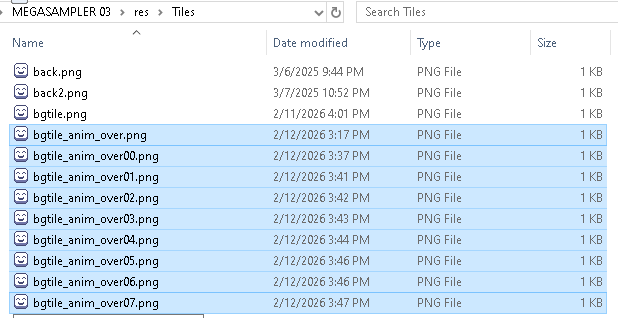
We have 8 versions of the background tile, ranging from fully black to fully visible (Index values 0 to 7 respectively). By swapping these tiles in a specific pattern, we create an animation. Go into the res > Tiles folder and take a look at each individual tile for reference.
The Setup
In megapong.c, we reserve a specific block of VRAM for these 8 transition tiles:
#define BG_FADE_INDEX 16
// Animation Array (0 = Black, 7 = Visible)
const Image* animFrames[8] = { ... };
2. The Math: Creating the "Wave"
To make the tiles fade in a wave pattern, we need to calculate a "distance" for every single tile on the screen (x, y).
We use Manhattan Distance, which is simply x + y. This creates a diagonal gradient.
Effect A: The "Draw-In" (Game Start)
Goal: The screen starts black and the game "wipes in" from the Top-Left (0,0) to the Bottom-Right.
The Logic:
- Origin: Top-Left (0, 0).
- Distance Formula:
dist = x + y.- At (0,0), distance is 0.
- At (1,1), distance is 2.
- Animation: We want the tiles close to (0,0) to appear first.
int dist = x + y;
// Calculate which frame to show (0..7)
// 'timeStep' increases as the animation plays.
// '7 - ...' reverses the logic so we go from Black -> Visible
int frame = 7 - (timeStep - dist);
// Clamp the value so we don't crash
if (frame < 0) frame = 0;
if (frame > 7) frame = 7;
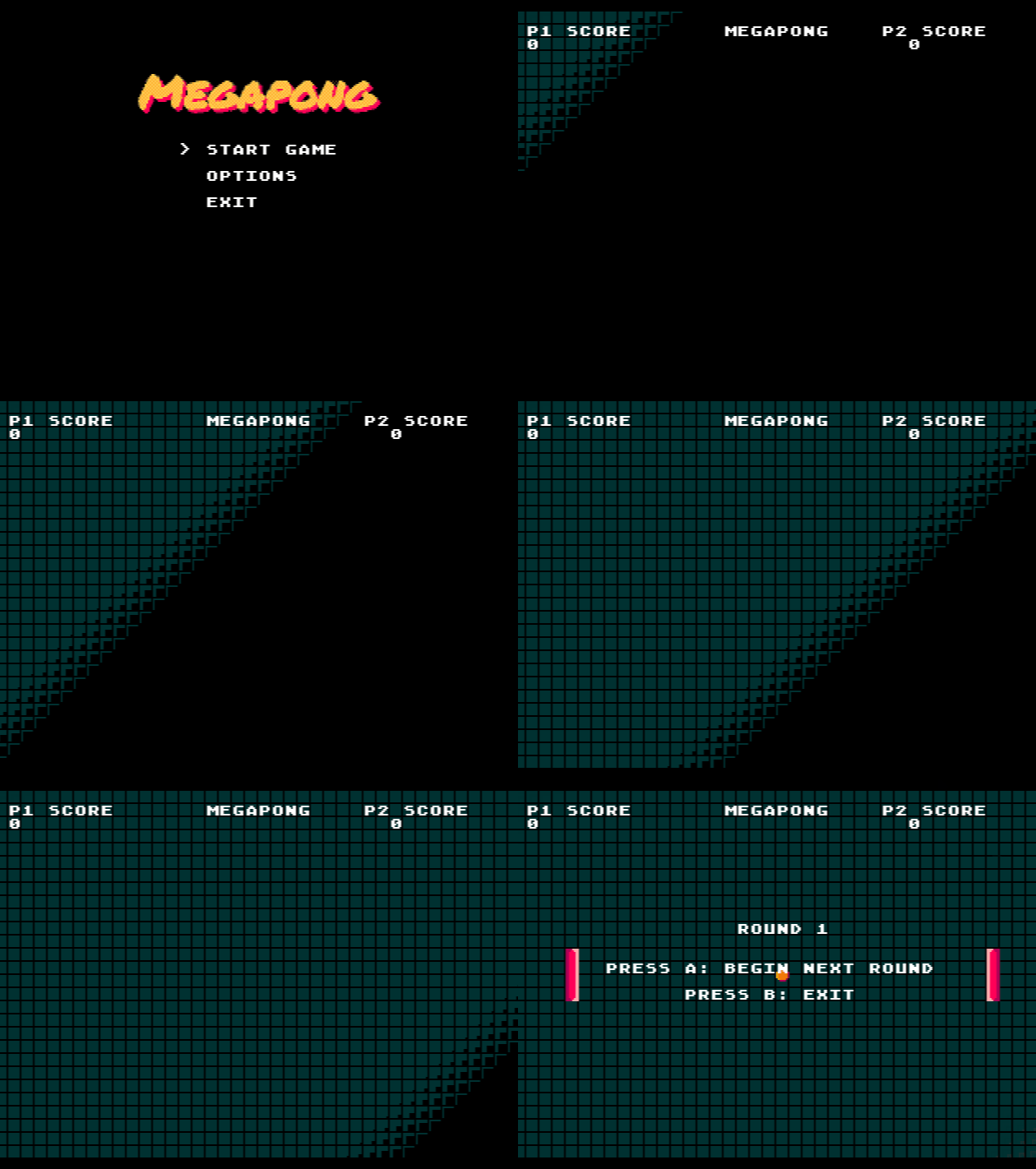
Effect B: The "Fade-Out" (Game Over)
Goal: The screen starts visible and "wipes out" to black, starting from the Bottom-Right (39, 29).
The Logic:
- Origin: Bottom-Right (39, 29).
- Distance Formula: We need the distance from the corner.
dist = (39 - x) + (29 - y)
- Animation: We want the tiles close to the bottom-right to turn black first.
int dist = (39 - x) + (29 - y);
// Standard logic: As time increases, 'frame' drops from Visible -> Black
int frame = timeStep - dist;
3. Optimization: The Buffer System
Updating 1,200 tiles (40x30) individually using VDP_setTileMapXY would be too slow and might cause screen tearing.
Instead, megapong.c uses a Buffer Strategy:
- Calculate in RAM: We run the loops and write the correct tile ID to a massive array called
bg_map_buffer.
// ... logic to fill buffer ...
bg_map_buffer[x + y * 40] = TILE_ATTR_FULL(...);
- Blast to VRAM: Once the entire frame is calculated, we send it to the VDP (Video Display Processor) in one single Direct Memory Access (DMA) command.
4. Putting it Together: The Wave Timer
We don't want the wave to move too fast. megapong.c uses a waveTimer to control the speed.
// Only update the screen every 4th frame (60fps / 4 = 15 updates/sec)
if (waveTimer % 4 == 0)
{
int timeStep = waveTimer / 4;
// ... run the loops ...
}
Tutorial Summary
- Don't just fade colors: You can animate the tilemap itself for cooler transitions.
- Use Math for Patterns:
x + ycreates a diagonal wave.xalone would be a horizontal wipe.yalone would be a vertical wipe. - Buffer Your Writes: Always calculate your tilemap changes in a RAM array first, then send it to the VDP all at once using
VDP_setTileMapDataRect. This keeps your game running at a smooth 60 FPS.