MEGASAMPLER – Merging in the Game(s)
Main objectives
1. Create a compilation of all the MEGA-TUTORIAL games from the OHSAT Games site
2. Create a menu and use a switch statement to select from the four games we’ve done: MEGAPONG, MEGARUNNER, MEGALAGA, and MEGATILER.
3. Keep our main.c clean by using header/.c files
4. Think of little touches we can add to make this feel like an actual game…even if it is a poor man’s Action 52
Coding the Mega___.h Header
I’m only going to focus on one game in this lesson, but you will have access to the code base to see the addition of the other Mega_____ titles. Frankly, the addition of the games into the code was done rather sloppily on my part so to spare myself some embarrassment we’re only going to look at MEGAPONG.
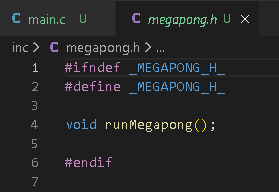
We want to create a megapong.h file and have it located in
inc/megapong.h within our project.
We’re going to have a function in it named runMegapong(); as that we’re calling
in main.c via our Switch statement. It should look like the following:
If you haven’t done so already, you can make .h files for
the other games as well.
Coding the Mega_____.c File
After making all the necessary mega____.h files for the four
games we’re including in our MEGASAMPLER/MEGACOLLECTION, we can make
corresponding .c files in the src/boot folder.
In this instance, we’re going to focus on the src/boot/megapong.c file.
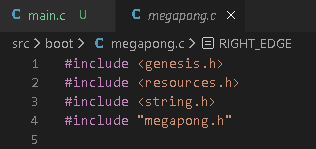
Before we start porting our code, we want to ensure that we’re adding all the #include
entries we’ll need. For MEGAPONG, we’ll need inclusions for <genesis.h>, <resources.h>, <string.h>, and "megapong.h". Notice that megapong.h uses quotation marks instead of angle brackets <>. This is because angle brackets in the code tell it to search for the header files native to your SGDK environment whereas the double-quotes are a header that we created within our project. Normally, I don’t bother to point these things out, but I remember this came up in one of the Pigsy lessons I hosted on EikSoft so I thought I would mention it now.
Our inclusions should look like the following:
Next, I’ve done a copy of the code from my CHOSPONG bonus tutorial of MEGAPONG and put it below. I’ve also taken the liberty of formatting the code a bit to make it more learner friendly.
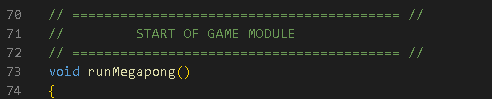
One important change that needs to be made is to change the int main(){ line of the CHOSPONG code base. We call our MEGAPONG game as a function that’s called within our main.c file. Therefore, in this megapong.c file we’ll need to replace the main(){ line with the following:
Declaring Resources
One thing I did later with my MEGATILER code that I didn’t
do with my other MEGA____ games is create a different .res file.
If you want to keep your asset management very granular, you can distribute
your assets among different folders and create corresponding .res files.
Looking at the inclusions in our Megapong.c code, you’ll see that I used the
standard resources.h header which points to our res/resources.res file. The
same holds true for the Megalaga.c and Megarunner.c files.
This isn’t necessary but I wanted to include it as an experiment. I declared my resources differently with MEGATILER.
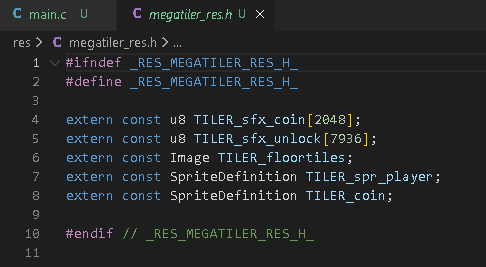
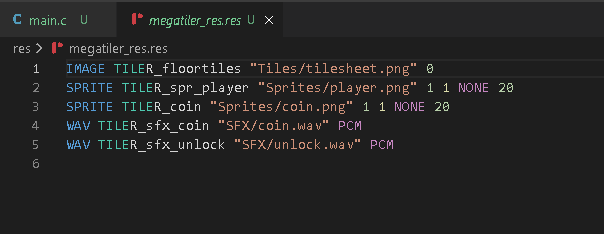
Looking at our res folder, you’ll see two files related to
MEGATILER: megatiler_res.res and megatiler_res.h.
You should be familiar with resource declaration at this point so I’m not going
to beat a dead horse but here’s what those respective files look like.
Megatiler_res
header file
Megatiler_res resource file
Exiting
Back to Menu: MEGAPONG >> MENU
The last thing I want to mention in this tutorial is something I added to the return the player back to the menu screen so that you don’t have to reset every time you want to load a new game.
There are essentially two things we need to accomplish.
1. Break out of the case statement that’s calling our game function
2. Make sure that we clear the screen of graphics assets and reset the VDP processor.
Note: if we had sound data we would probably want to wipe that s well…or did we? 😉
The process I’ve used is rather simple. Within the main game
loop for MEGAPONG/CHOSPONG, I assigned BUTTON B on Controller 1 to trigger the
soft reset back to the main menu.
Then, it’s just a matter of offloading the assets with two simple functions:
Spr_end(); and VDP_resetScreen(); Pay attention to the color of the braces.
I’ll paste the complete game loop for MEGA-ULTRA-CHOSBY-TASTIC PONG below for reference.
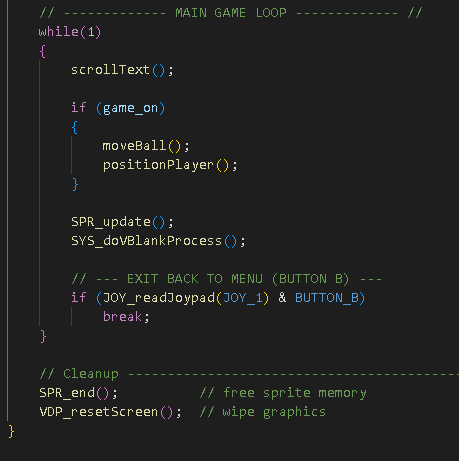
You should notice that the call for Button B is in the main
game loop i.e. while(1) and the wipe/clean up functions are below the while(1)
loop at the bottom of the void runMegapong() function.
One thing that I forgot to mention earlier but is important is something
included at the beginning of the runMegapong function is the following:
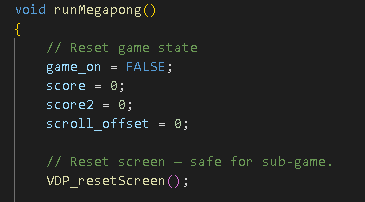
Transitioning from the Menu to a game, I did include a VDP_resetScreen() function. When hopping from Menu to Game and Game to Menu it’s always a good idea to clear the VDP. Carrying over residual values is bad but so is carrying over residual assets.
Take the time to look through my code carefully, try not to
cringe, and see if you can follow along with what I’m doing in each game. You
should have a general idea of what is being accomplished at this point.
Good luck and game on! Cheers!