MEGASAMPLER – Using Switch Statements
Main objectives
1. Create a compilation of all the MEGA-TUTORIAL games from the OHSAT Games site
2. Create a menu and use a switch statement to select from the four games we’ve done: MEGAPONG, MEGARUNNER, MEGALAGA, and MEGATILER.
3. Keep our main.c clean by using header/.c files
4. Think of little touches we can add to make this feel like an actual game…even if it is a poor man’s Action 52
Structuring our main.c file
We’re going to try and keep as much bloat out of main.c as we can. To do this, we’re going to create some header and .c files to house our code for our games.
In the inc folder, we’re going to make the following files:
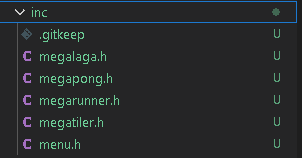
We’ll want to make corresponding .c files in the src/boot folder
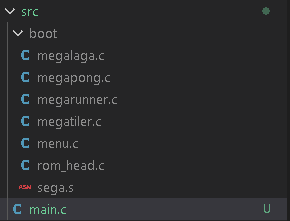
What we have are header/.c files for each game we’ve created and a header/.c file for the menu we’re going to use for selecting a game.
Now that we’ve done this, we’ll want to make sure we declare these header files at the top of our code.
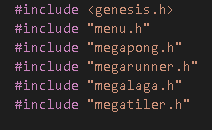
The header file information for each game is going to be rather simple. It should follow the same structure for each .h file for our various games.
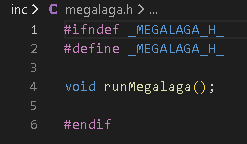
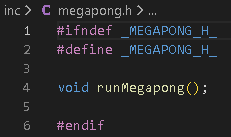 etc.
etc.
We’ll address the corresponding .c code later.
Using a Switch Statement
Back in main.c we’re going to use a switch statement in our game loop to call the selected game.
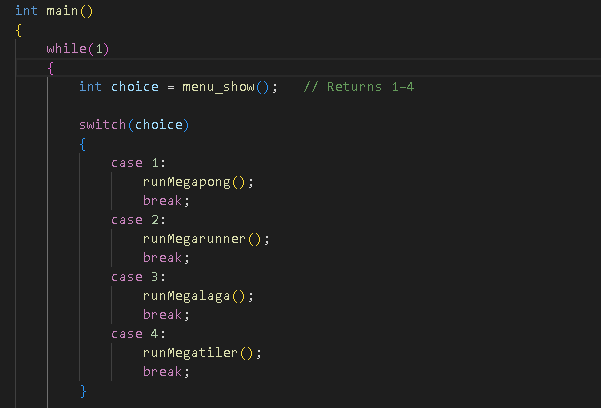
We’re going to use an integer named choice and have choice
equal menu_show(); We’ll return to this when we’re
ready to look at our menu.h and menu.c
code. For now, let’s look at the switch statement.
The condition/expression of our switch() is our choice integer. If you look at
each case, you’ll notice that it’s calling the runMega______();
function that were in our various Mega____.h game
headers.
The purpose of this switch(choice) is to call the menu_show() function and have it return a variable of 1 through 4. Each variable will call the code to run our specific game. Before we start working on the menu.h/.c files to create our menu, we’re going to move on to one last thing in main.c
Clearing Assets on Reset
These are rather simple games with simple controls. What
we’re going to do is make it so that we can press a button to reset back to the
menu screen. However, once that is done, we need to ensure that no lingering
sprites/sfx/etc. are present after a reset.
To do this, we’ll need a series of functions to tell SGDK to stop and reset.
Note: Some of the formatting of these functions may differ depending on your
version of SGDK.
Just below our switch(choice) statement, we’ll add the
following functions.
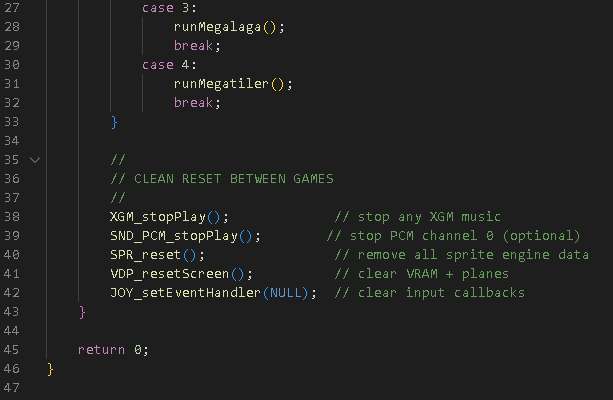
I’ve commented out the code to explain what each function accomplishes but you can hover your mouse over each function if you need a more thorough explanation.
Our main.c
file is done for the moment. In the next lesson, we’ll stat
working on creating our menu header and menu.c
file.
Cheers!