MEGASAMPLER – Making a Menu
Main objectives
1. Create a compilation of all the MEGA-TUTORIAL games from the OHSAT Games site
2. Create a menu and use a switch statement to select from the four games we’ve done: MEGAPONG, MEGARUNNER, MEGALAGA, and MEGATILER.
3. Keep our main.c clean by using header/.c files
4. Think of little touches we can add to make this feel like an actual game…even if it is a poor man’s Action 52
Coding the Menu.h Header
The menu.h header file is very straightforward. All we’re going to do is call a function named menu_show but set it as an integer and not void.
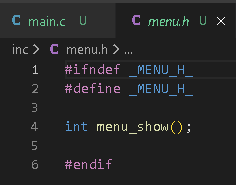
If you want to know the difference between int and void then I suggest you purchase a copy of The C Programming Language by Brian W. Kernighan and Dennis M. Ritchie.
The meat and potatoes of this lesson is the menu.c file so
let’s move on for now.
Coding the Menu.c File
First, we need to reference the genesis.h and menu. header
files.
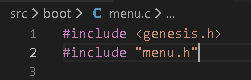
Next, we’re going to add a variable called selection and assign it a u16 value. We have four games so we’re going to select 1 through 4 or 0 through 3 if we’re iterating through an array. The four choices will correspond to the switch statement back in main.c

Handling Controller Inputs for Menu Screen
To be able to make selections on a menu screen we’ll need to use the controller (JOYPAD) to make said selections. Therefore, we’re going to write a JoyHandler function called handleInput(u16 joy, u16 changed, u16 state). This should be rather familiar to you at this point.
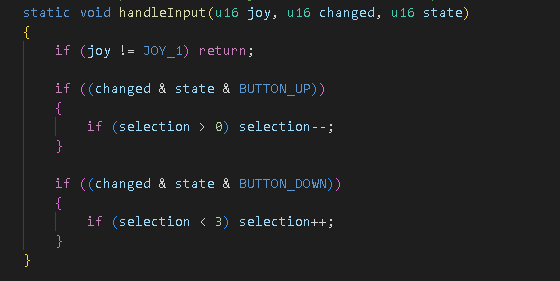
We check for an input for Joypad 1 and then we’re iterating though the list by incrementing/moving up if selection is less than 3 and decrementing/moving down if selection is less than 0.
Coding menu_show()
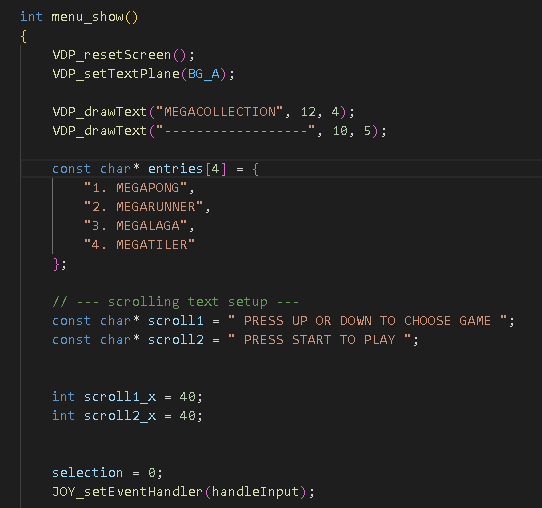
Here is where we write the code to display the text on
screen for our different options: MEGAPONG, MEGARUNNER, MEGALAGA, and
MEGATILER.
Initially, we’re going to add functions that will reset the screen settings and
then we’re going to define our text plane. That’s done with the
VDP_resetScreen() and VDP_setTextPlane() respectively.
Note: SGDK will default to putting the text on BG_A but I’ve declared it just
in case it needs to be changed later.
Next, we’re going to draw a nice little title called MEGACOLLECTION. If you want to rename it MEGASAMPLER to keep it consistent with the name of the tutorial then go for it. Drawing text on screen is done with the VDP_drawText function.
For our selection of games, we’re going to use a character array called entries to list our titles.
In the image it shows additional character variables for scroll1 & scroll2 but we’ll discuss those later.
Below the array, we’re going to declare selection = 0; within
int menu_show(). If you’re aware of the tile incrementation issue I was having
with MEGATILER you’ll have an idea what might happen if I don’t declare it
again here.
We then want to initiate our controller by using
JOY_setEventHandler(handleInput); You’ll notice that our handleInput function
is a part of the condition/expression. There are different ways of going about
coding controls but this is the method I’m using for now.
Moving through the character array and incrementing u16 selection
In our game loop, we’re going to use a for() statement to iterate through the array.
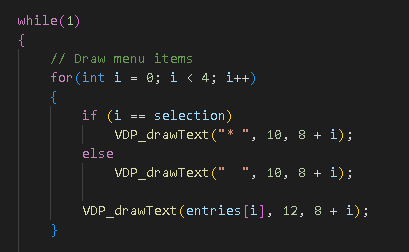
Assuming you’ve gone through the other lessons, using a for() statement should be pretty commonplace for you at this point but I’ll try to explain what’s happening. We’re setting integer ‘i’ to zero. Then, we’re going to do a check on the value of ‘i’. Integer ‘i’ is also less than 4. Integer ‘i’ can also increment and given our boundary it can go from 0 to 1 to 2 to 3 but can’t be 4.
The statement then houses an if and else conditional. The purpose of the if and else statements is to position the asterisk on screen. The array will draw the asterisk at tile-coordinate position (10,8). The y-tile coordinate is incremented + [value of integer ‘i’].
As we stated above, we start at zero and count to three. Therefore, result of the if/else is going to position our asterisk (10, 8+0), (10, 8+1), (10, 8+2), and (10,8+3). This should be somewhat familiar to you if you’ve done the text scrolling lesson on the OHSAT Games site. The asterisk is acting as a cursor and should move up and down with the player input on the D-pad. As you adjust the value of integer ‘i’ by moving up or down you want to ensure that the other fields don’t draw an asterisk but instead draw a blank.
Lastly, we need to specify what text we want to draw to the
screen so we call our character array of entries within VDP_drawText. Setting
the character array to entries[i] tells the VDP to draw the lines of text
starting from Line 0 to Line 3.
Line 0: 1. MEGAPONG (I used pong code
called CHOSPONG so I should probably change my text at some point).
Line 1: 2. MEGARUNNER
Line 2: 3. MEGALAGA
Line 3: 4. MEGATILER
Input check on START
We’re almost done with menu.c (other than the unnecessary extra stuff I added regarding text scrolling).
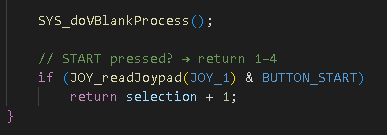
We’re going to use an if() statement to pass along the value for u16 selection once START is pressed.
To accomplish this, we just ask for a return selection + 1; to return a value of 1 through 4. Remember, we initially set u16 selection = 0; but we’re tying our menu_show function to our case values so we need to return values 1 through 4.
Just be sure to add this below the SYS_doVBlankProcess() function.
Optional/Unnecessary Text Scrolling
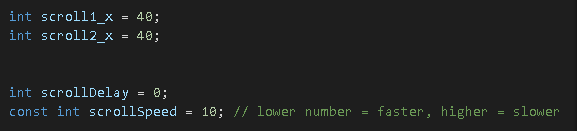
For scrolling, we’re going to declare some variables above
int menu_show().
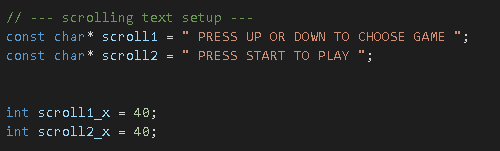
Next, we’re going to define what text we want to draw/scroll
and an integer to tie to scrolling vertically (x-plane). We’re doing this
inside of int menu_show().
Finally, we’re going to put information in the game loop to move the text along as the screen refreshes.
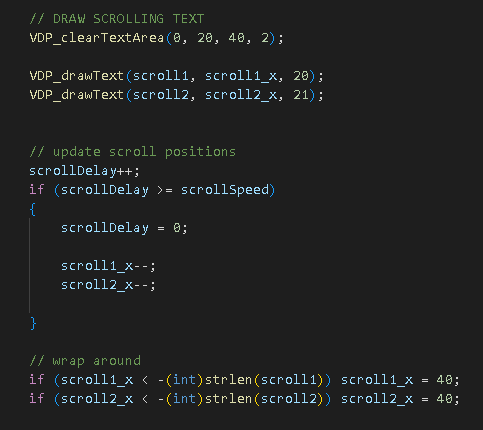
As we mentioned above, we’re tying the scroll speed to frame speed. We need to set a block of text area to clear as the text is continually redrawn with each frame update. That’s what the VDP_clearTextArea function is for. Otherwise, our text would start to overlap each frame as it moved along the screen.
Each line of text has been assigned a character of scroll#, our x position uses integer scroll#_x, and we’re hard-coding our y-position since the text isn’t going to vertically crawl.
Finally, we use if() statements to define the horizontal scrolling. Rather than explain exactly what’s happening maybe you can play around with the values to see what happens. Just be mindful of what your declarations are otherwise you might break your code.
Cheers!